Showing posts with label keypad. Show all posts
Showing posts with label keypad. Show all posts
Sunday, November 16, 2014


Nokia 2710 No Keypad Backlight LED solution to fix solution
Heres the solution that may help fix and repair a nokia 2710 with a keypad LED not working problem.
If ever encountered this problem the solution below will show us of which and what particular components that needs to be check for repair.
This solution may works and can be used if the LEDs already been checked by a multimeter and are still working and not already busted or blown out.

Th solution above showed the Nokia 2710 LED driver circuit, this circuit holds the LCD and keypad backlights LEDs to work. Therefore if this said chip become damaged, may result to LCD and keypad LEDs failure or unable to light up.
But if only the keypad keys LEDs does not work or light up, you may first check the line paths of the keypads backlight LEDs supply voltage.You may start to check the LED first and the keypad membrane flex cable: Then trace the line paths from the keypad pin connector through to a corresponding components where it is being connected.
There are certain components such as the filter coils and resistors on the circuit, you may check this components and replace if found damaged. Just then follow the simple instructions showed on solution above, hope this may help fix and repair Nokia 2710 keypad back light not working problem.
Read More..
If ever encountered this problem the solution below will show us of which and what particular components that needs to be check for repair.
This solution may works and can be used if the LEDs already been checked by a multimeter and are still working and not already busted or blown out.
Nokia 2710 Keypad backlight LED solution

Th solution above showed the Nokia 2710 LED driver circuit, this circuit holds the LCD and keypad backlights LEDs to work. Therefore if this said chip become damaged, may result to LCD and keypad LEDs failure or unable to light up.
But if only the keypad keys LEDs does not work or light up, you may first check the line paths of the keypads backlight LEDs supply voltage.You may start to check the LED first and the keypad membrane flex cable: Then trace the line paths from the keypad pin connector through to a corresponding components where it is being connected.
There are certain components such as the filter coils and resistors on the circuit, you may check this components and replace if found damaged. Just then follow the simple instructions showed on solution above, hope this may help fix and repair Nokia 2710 keypad back light not working problem.
Thursday, November 6, 2014

Sunday, November 2, 2014
Nokia X3 No LCD and keypad backlight LED solution
Heres a solution that may possibly help fix and repair Nokia X3 Failure of LED backlight on keypad and LCD Lcd display. This solution completely shows the lines paths and particular components that may need to check and replace if the LED backlight failed to light up.  There is a fusible resistor is been connected to the LED backlight circuit in case a short circuit occurred if the device is being damaged by a liquid (Wet Damaged). See solution above marked with number 1.
That resistor is the one feeds the power supply from the phones battery.
If that resistor is open both keypad and LCD display LEDs will not light up for it is the main LED supplying positive voltage.
The negative current or voltage has two circuits, one for the LCD (marked with number 4) and the other one is for the keypads (marked with number 3).
You may check / replace each particular corresponding connected components highlighted on the picture for further troubleshooting.
Nokia X3 No LCD and keypad backlight LED repair solution

That resistor is the one feeds the power supply from the phones battery.
If that resistor is open both keypad and LCD display LEDs will not light up for it is the main LED supplying positive voltage.
The negative current or voltage has two circuits, one for the LCD (marked with number 4) and the other one is for the keypads (marked with number 3).
You may check / replace each particular corresponding connected components highlighted on the picture for further troubleshooting.
Nokia X3 LCD and keypad backlight LED failure solution

Thursday, October 16, 2014
Nokia X2 05 Keypad Not Working Problem Solution Jumper Ways
Nokia X2-05 keypad is not working, A few keys of Nokia X2-05 are not working, Keypad Hang and double values when press a single time. Or un proper keypad functions.nokia Asha 203 ight problem solution with jumpers

In all above cases and problem we can follow this post to solve Nokia X2-05 keypad problem in a few steps. If you press a single key and some other keys are also working it can be cause of water damages and rus, carbon. If you press keys and they do not reflect any process it can be problem of missing push button, missing components, burn parts.
After dis assembly of Nokia X2-05 look at the motherboard for rust carbon or burn parts. If you found some rust or carbon apply electronics cleaner on the mother board and apply hot air to make it dry proper.
Applying too much heat can damage the mother board and parts.It also can be harm for your skin.So keep in mind about normal heat flow when making it dry.
In above diagram you can see some different color lines all these different color inner and outer keys have same value according to the color schame. So if a single key is not working we can check its inner and outer value with meter and apply jumper from the other one which is working in normal condition.
If all keys are not working we can re sold and re flow Keypad IC. If replacement can not solve the keypad problem in Nokia X2-05 we have to replace it with new one.
In this diagram you can also see Nokia X2-05 On Off Power Button ways and jumpers.
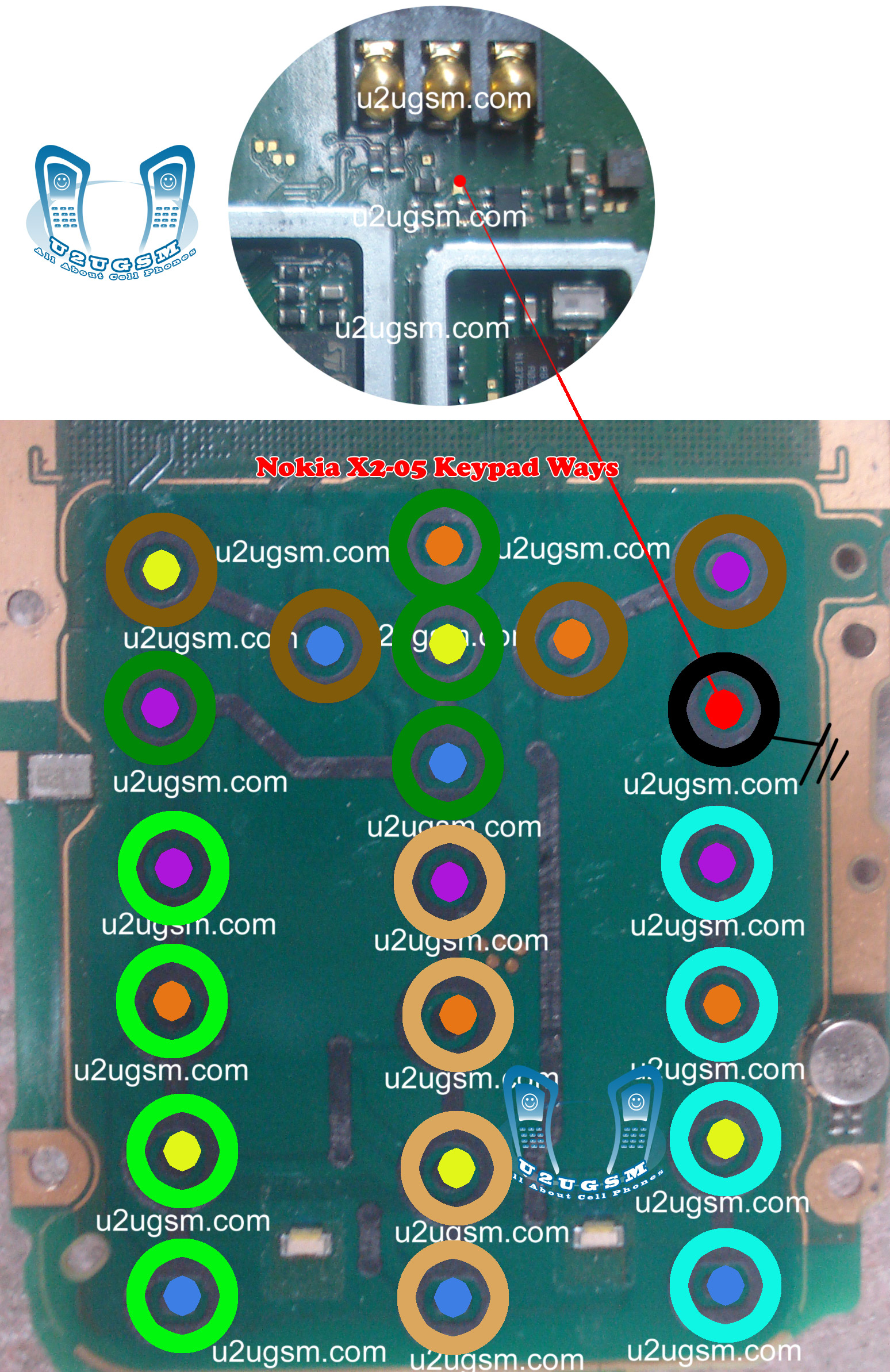
In all above cases and problem we can follow this post to solve Nokia X2-05 keypad problem in a few steps. If you press a single key and some other keys are also working it can be cause of water damages and rus, carbon. If you press keys and they do not reflect any process it can be problem of missing push button, missing components, burn parts.
After dis assembly of Nokia X2-05 look at the motherboard for rust carbon or burn parts. If you found some rust or carbon apply electronics cleaner on the mother board and apply hot air to make it dry proper.
Applying too much heat can damage the mother board and parts.It also can be harm for your skin.So keep in mind about normal heat flow when making it dry.
In above diagram you can see some different color lines all these different color inner and outer keys have same value according to the color schame. So if a single key is not working we can check its inner and outer value with meter and apply jumper from the other one which is working in normal condition.
If all keys are not working we can re sold and re flow Keypad IC. If replacement can not solve the keypad problem in Nokia X2-05 we have to replace it with new one.
In this diagram you can also see Nokia X2-05 On Off Power Button ways and jumpers.
Wednesday, September 24, 2014

Monday, September 15, 2014
Nokia 2710 Lcd Keypad Light fix problem

now i share this how to working fine
Nokia Mobile 2710 Lcd & Keypad Light How to Fix problem,
Nokia Mobile 2710 Lcd & Keypad Light Ways How to Fix problem,
Nokia Mobile 2710 Lcd & Keypad Light damage How to Fix problem,
Nokia Mobile 2710 Lcd & Keypad Light print damage How to Fix problem,
Nokia Mobile 2710 Lcd & Keypad Light jumper How to Fix problem,
Nokia Mobile 2710 BLcd & Keypad Light line missing How to Fix problem,
Nokia Mobile 2710 Lcd & Keypad Light Diagram,
can i help you to solved your problem ?
Please Write Me Only One Comment:) Dont waste your time to writing comment ok no problem now give me only 5 Seconds to Share My Post
Wednesday, September 3, 2014
Nokia 1110 Keypad IC Jumper Make Video

if you check it much give few comments about this so that others can learn form your comments also.
If you have any other Questions please do not hesitate to share with me.
Friday, August 15, 2014
Subscribe to:
Posts (Atom)
