Showing posts with label asha. Show all posts
Showing posts with label asha. Show all posts
Sunday, November 16, 2014


Tuesday, October 28, 2014
Nokia Asha 202 MMC Memory card problem solution
Nokia Asha 202 MMC Problem, Nokia Asha 202 Memory Card Solution, Memory Card Not formatted, Memory Card Not detected problem solution in Nokia Asha 202. All these memory card problem solutions are possible by following diagrams that I am going to post in this post.
nokia C5-03 USB not charging Not detect problem solution jumpers

Replace memory card and check it again. If card is not formatted make it format with card settings from Nokia Asha 202 or format the memory card with computer.
After dis assembly of nokia asha 202 check the whole mother borad for water damages or carbon on it. If you find it clean mother board with electronics cleaner and apply hot air to make it dry.
Do not apply much heat it can damage the nokia sha 202 mother board or may can harm your skin also. Check red line Ic that is used for memory card function in Nokia Asha 202. Re sold it and re flow the IC. If resolding of the memory card IC can not solve MMC problem you have to replace thic MMC Ic in nokia asha 202.
Read More..
nokia C5-03 USB not charging Not detect problem solution jumpers
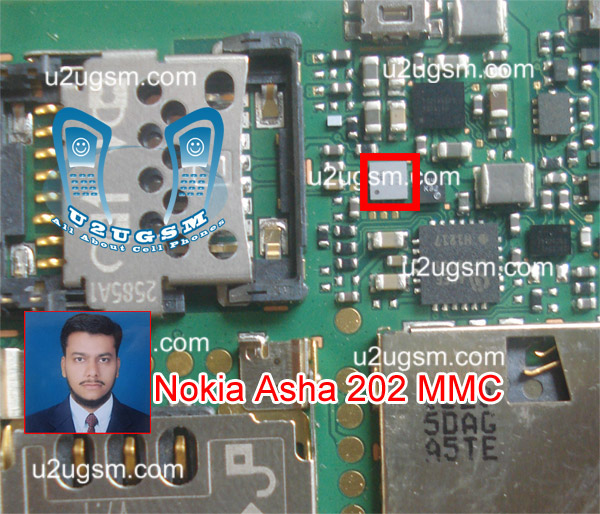
Replace memory card and check it again. If card is not formatted make it format with card settings from Nokia Asha 202 or format the memory card with computer.
After dis assembly of nokia asha 202 check the whole mother borad for water damages or carbon on it. If you find it clean mother board with electronics cleaner and apply hot air to make it dry.
Do not apply much heat it can damage the nokia sha 202 mother board or may can harm your skin also. Check red line Ic that is used for memory card function in Nokia Asha 202. Re sold it and re flow the IC. If resolding of the memory card IC can not solve MMC problem you have to replace thic MMC Ic in nokia asha 202.
Monday, September 22, 2014

Thursday, September 11, 2014
Nokia Asha 301 Configuration
| GENERAL | 2G Network | GSM 850 / 900 / 1800 / 1900 |
|---|---|---|
| 3G Network | HSDPA 850 / 900 / 1700 / 1900 / 2100 | |
| SIM | Mini-SIM | |
| Announced | 2012, June | |
| Status | Available. Released 2012, August |
| BODY | Dimensions | 106 x 52 x 12.9 mm, 92 cc (4.17 x 2.05 x 0.51 in) |
|---|---|---|
| Weight | 95 g (3.35 oz) |
| DISPLAY | Type | TFT capacitive touchLcd, 65K colors |
|---|---|---|
| Size | 240 x 400 pixels, 3.0 inches (~155 ppi pixel density) | |
| Multitouch | Yes | |
| Protection | Corning Gorilla Glass |
| SOUND | Alert types | Vibration, Polyphonic(64), WAV, MP3 ringtones |
|---|---|---|
| Loudspeaker | Yes | |
| 3.5mm jack | Yes |
| MEMORY | Card slot | microSD, up to 32 GB |
|---|---|---|
| Phonebook | Yes, Photocall | |
| Call records | Yes | |
| Internal | 140 MB, 256 MB ROM, 128 MB RAM |
| DATA | GPRS | Yes |
|---|---|---|
| EDGE | Yes | |
| Speed | HSDPA, 14.4 Mbps; HSUPA, 5.76 Mbps | |
| WLAN | Wi-Fi 802.11 b/g/n | |
| Bluetooth | Yes, v2.1 with EDR | |
| USB | Yes, microUSB v2.0, USB On-the-go |
| CAMERA | Primary | 3.15 MP, 2048x1536 pixels |
|---|---|---|
| Video | Yes, VGA@25fps | |
| Secondary | No |
| FEATURES | CPU | 1 GHz |
|---|---|---|
| Sensors | Accelerometer, proximity | |
| Messaging | SMS, MMS, Email, IM | |
| Browser | WAP 2.0/xHTML, HTML | |
| Radio | Stereo FM radio with RDS | |
| Games | Yes + downloadable | |
| GPS | No | |
| Java | Yes | |
| Colors | Dark Grey, Rose Red, Blue, Brown, Sand White | |
| - SNS integration - MP4/H.264/H.263/WMV player - MP3/WAV/WMA/AAC player - Organizer - Voice memo - Predictive text input |
| BATTERY | Li-Ion 1110 mAh battery (BL-4U) | |
|---|---|---|
| Stand-by | Up to 696 h (2G) / Up to 768 h (3G) | |
| Talk time | Up to 14 h (2G) / Up to 6 h (3G) | |
| Music play | Up to 40 h |
| MISC | SAR US | 1.09 W/kg (head) 0.79 W/kg (body) |
|---|---|---|
| SAR EU | 1.37 W/kg (head) | |
| Price group |  |
Friday, September 5, 2014
Nokia Asha 311 Power Button On Off Switch Not Working Problem
Nokia Asha 311 Power Button On Off Switch Not Working Problem
if you have a Nokia Asha 311 dead they may can have a power switch on off problem so please in first step plug in a charger and if Nokia Asha 311 is charging proper and well but not getting on it means the main problem can be power switch on off fault.
![Nokia]()
so for this you have to change power switch button on off button in Nokia Asha 311 if prints are also damge in Nokia Asha 311 for on off button then here is a full path and track for power switch button in diagram that is attached with this post so check all this path and track for power switch on off button in Nokia Asha 311 and if any of these links broken than make these jumpers as shown in diagram with red line while blue color is indicated for ground print.
so for this you have to change power switch button on off button in Nokia Asha 311 if prints are also damge in Nokia Asha 311 for on off button then here is a full path and track for power switch button in diagram that is attached with this post so check all this path and track for power switch on off button in Nokia Asha 311 and if any of these links broken than make these jumpers as shown in diagram with red line while blue color is indicated for ground print.
for more detail and new tips and tricks about this problem keep visiting this page we will update it timely with new diagrams.some related post are also given bellow you can read them also for more information
Wednesday, September 3, 2014
Nokia asha 305 ear speaker problem solution
Now I start discuses about nokia 305 ear speaker problem solution. When damage ear speaker then ear speaker dos not work now I showing how to repair this.It is very easy solution.every body can repair this very easily.just following below picture.

How to do this : Check ear speaker then check ear speaker ways that means red line ways.If you found any problem repair that.
Monday, September 1, 2014

Friday, August 29, 2014
Nokia Asha 300 ringar ways Problem with Jumper Solution
Nokia Asha 300 ringar ways solution
Saturday, August 23, 2014
Asha 300 Charging Problem Ways Solution

the following article. Nokia Asha 300 Charger not supported problem
solutions will also be found in the diagrams further in this post.
In Nokia Asha 300 Charger Not Supported Problem can occur because of
the broken Charging Connector or it's bad connection to the Cell
Phone's Motherboard. Sometimes a faulty battery can cause charging
problems. So first of all you should clean Nokia Asha 300 Charging
Connector Ways and Motherboard of the Mobile Phone. If cleaning does
not work, can replace the Charging Connector.
Please Note that we will edit these solutions or add new ones if found
in this page at any time in the future. So feel free to come back any
time on this page to stay up to date.
If you have further Questions please don't hesitate to leave a comment.
Note: Every repairing solution posted here is tested by at least one
member of our team. Use the information available here at Your Own
Risk. We are not responsible if any harm comes to your device during
the repairing process.
Friday, August 22, 2014
Asha 305 Asha 306 Mic Ways how to fix problem
This article is for Nokia Asha 305 and Nokia Asha 306 Mic Ways and Problem Solutions. These jumper points despite some hardware differences work on both of these phones.
In Nokia Asha 305 or Nokia Asha 306 Mic problem do not occur very often but if your phone gets it replacing the Microphone is recommended. If your microphone prints are broken by any chance I have marked there jumper points in the following diagram. Microphone is on the front side of the motherboard in these phones.
Please Note that we will edit these solutions or add new ones if found in this page at any time in the future. So feel free to come back any time on this page to stay up to date.

If you have further Questions please dont hesitate to leave a comment.
Note: Every repairing solution posted here is tested by at least one member of our team. Use the information available here at Your Own Risk. We are not responsible if any harm comes to your device during the repairing process.
Thursday, August 21, 2014
Asha 305 Asha 306 Camera Ways how to fix problem
This solution is for Nokia Asha 305 and Nokia Asha 306 Camera Problem Solution. Despite The Sim card differences this solution works on both Nokia Asha 305 and Nokia Asha 306.
Camera Problem in these phones can occur because of busted Camera Module or damaged Camera Connector. In case of broken camera module replace it with a new one. If you have a broken camera connector I have marked all the Nokia Asha 306 Camera Connector Ways in the following diagram. I have marked all 12 Camera Connector legs with different colors to avoid confusion.
Please Note that we will edit these solutions or add new ones if found in this page at any time in the future. So feel free to come back any time on this page to stay up to date.

If you have further Questions please dont hesitate to leave a comment.
Note: Every repairing solution posted here is tested by at least one member of our team. Use the information available here at Your Own Risk. We are not responsible if any harm comes to your device during the repairing process.
Subscribe to:
Posts (Atom)
