Showing posts with label x2. Show all posts
Showing posts with label x2. Show all posts
Monday, November 17, 2014


Wednesday, November 12, 2014
Nokia X2 02 Memory Card Not Detected Solution

Nokia X2-02 Memory Card Not Detected Solution
nokia X2 02 light problem repair solution here

nokia x2-02 hardware fault , nokiahardware x2-02 light fault , nokia x2-02 Display light jumpar , nokia x2-02Light , nokiax2-02 light fault , nokia x2-02 light fault view , nokia x2-02 light problem selection , nokia x2-02 light jumper
Friday, October 17, 2014
Nokia X2 05 Speaker problem solution jumper ways
Nokia X2-05 speaker problem, Nokia X2-05 earpiece jumper ways, Nokia X2-05 mic is not working, Nokia X2-05 speaker jumpers, speaker is not working or low voice and noise.Nokia X2-02 Lcd Display Jumper Ways Problem Solution

If Nokia X2-05 speaker has low voice or nosie it can be problem of speaker ear piece. If no voice in it that may can be cause of missing or damage parts. The noise can also be due to water damages in Nokia X2-05.
If speaker is not working or have a low voice it can be fault of speaker and housing. Check Nokia X2-05 housing ( body ). All housing have a small whole at the point of ear piece. In some cases rust or dust cover this point and the voice can not reach proper to the mic point so make it clean if there is some dust on it.
After disassambly of Nokia X2-05 look at the motherboard for rust carbon or burren parts. If you found some rust or carbon apply electronics cleaner on the mother board and apply hot air to make it dry proper.
Applying too much heat can damage the mother board and parts.It also can be harm for your skin.So keep in mind about normal heat flow when making it dry.
Check all these tracks that are provided in above diagram to solve speaker problem in Nokia X2-05. In diagram two different color lines are given to identify all parts that are used to solve Nokia X2-05 speaker problem with jumpers.
If some parts are missing or damage apply jumper on these points where small circles are pointing in nokia mic repairing diagram above.
If Nokia X2-05 speaker has low voice or nosie it can be problem of speaker ear piece. If no voice in it that may can be cause of missing or damage parts. The noise can also be due to water damages in Nokia X2-05.
If speaker is not working or have a low voice it can be fault of speaker and housing. Check Nokia X2-05 housing ( body ). All housing have a small whole at the point of ear piece. In some cases rust or dust cover this point and the voice can not reach proper to the mic point so make it clean if there is some dust on it.
After disassambly of Nokia X2-05 look at the motherboard for rust carbon or burren parts. If you found some rust or carbon apply electronics cleaner on the mother board and apply hot air to make it dry proper.
Applying too much heat can damage the mother board and parts.It also can be harm for your skin.So keep in mind about normal heat flow when making it dry.
Check all these tracks that are provided in above diagram to solve speaker problem in Nokia X2-05. In diagram two different color lines are given to identify all parts that are used to solve Nokia X2-05 speaker problem with jumpers.
If some parts are missing or damage apply jumper on these points where small circles are pointing in nokia mic repairing diagram above.
Thursday, October 16, 2014
Nokia X2 05 Keypad Not Working Problem Solution Jumper Ways
Nokia X2-05 keypad is not working, A few keys of Nokia X2-05 are not working, Keypad Hang and double values when press a single time. Or un proper keypad functions.nokia Asha 203 ight problem solution with jumpers

In all above cases and problem we can follow this post to solve Nokia X2-05 keypad problem in a few steps. If you press a single key and some other keys are also working it can be cause of water damages and rus, carbon. If you press keys and they do not reflect any process it can be problem of missing push button, missing components, burn parts.
After dis assembly of Nokia X2-05 look at the motherboard for rust carbon or burn parts. If you found some rust or carbon apply electronics cleaner on the mother board and apply hot air to make it dry proper.
Applying too much heat can damage the mother board and parts.It also can be harm for your skin.So keep in mind about normal heat flow when making it dry.
In above diagram you can see some different color lines all these different color inner and outer keys have same value according to the color schame. So if a single key is not working we can check its inner and outer value with meter and apply jumper from the other one which is working in normal condition.
If all keys are not working we can re sold and re flow Keypad IC. If replacement can not solve the keypad problem in Nokia X2-05 we have to replace it with new one.
In this diagram you can also see Nokia X2-05 On Off Power Button ways and jumpers.
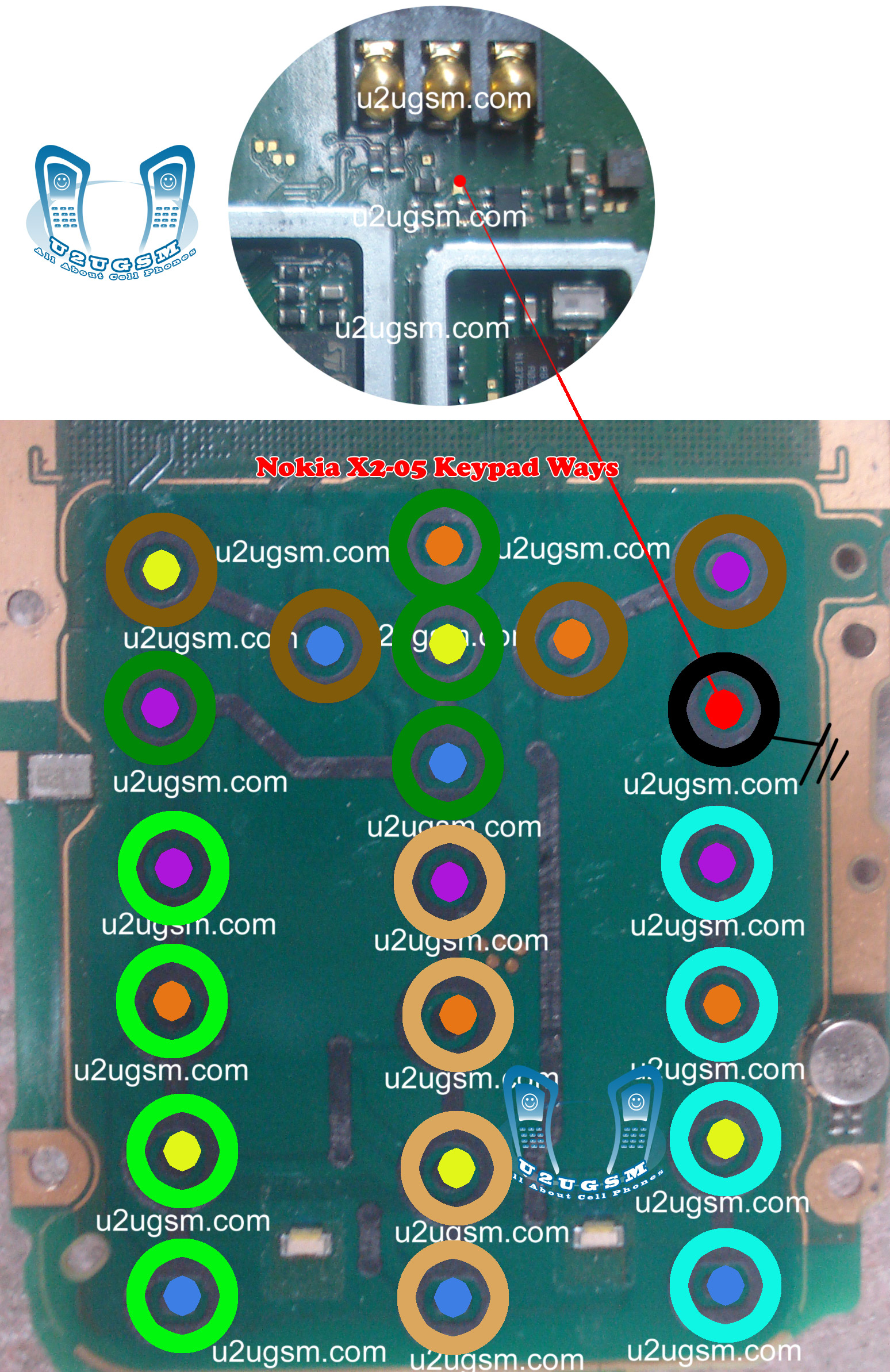
In all above cases and problem we can follow this post to solve Nokia X2-05 keypad problem in a few steps. If you press a single key and some other keys are also working it can be cause of water damages and rus, carbon. If you press keys and they do not reflect any process it can be problem of missing push button, missing components, burn parts.
After dis assembly of Nokia X2-05 look at the motherboard for rust carbon or burn parts. If you found some rust or carbon apply electronics cleaner on the mother board and apply hot air to make it dry proper.
Applying too much heat can damage the mother board and parts.It also can be harm for your skin.So keep in mind about normal heat flow when making it dry.
In above diagram you can see some different color lines all these different color inner and outer keys have same value according to the color schame. So if a single key is not working we can check its inner and outer value with meter and apply jumper from the other one which is working in normal condition.
If all keys are not working we can re sold and re flow Keypad IC. If replacement can not solve the keypad problem in Nokia X2-05 we have to replace it with new one.
In this diagram you can also see Nokia X2-05 On Off Power Button ways and jumpers.
Saturday, September 6, 2014

Tuesday, August 26, 2014
Nokia X2 00 battery connector ways Solution
Nokia X2 with Battery Jack Problem, Battery Points, Battery Power Ways, Battery Terminal, Battery Terminal Jumpers, Battery Terminal Solution
nokia x2-00 battery connector ways
nokia x2-00 battery empty solution
nokia x2-00 dead problem image
nokia X2 battery empty solution
x2 dead solution
nokia c5-00 battery connector way
nokia x2 00 set dead solution
nokia x2 dead jumper
nokia x2 battery empty problem
nokia x2-02 set ded water damage
nokia x2-00 dead
![nokia]()
there are three different color lines in this post shows that how you can make jumpers so check these links with meter and if any of them is broken make these jumpers with insulation wire
nokia x2-00 battery connector ways
nokia x2-00 battery empty solution
nokia x2-00 dead problem image
nokia X2 battery empty solution
x2 dead solution
nokia c5-00 battery connector way
nokia x2 00 set dead solution
nokia x2 dead jumper
nokia x2 battery empty problem
nokia x2-02 set ded water damage
nokia x2-00 dead
there are three different color lines in this post shows that how you can make jumpers so check these links with meter and if any of them is broken make these jumpers with insulation wire
Tuesday, August 19, 2014
Nokia X2 00 Mic Jumper Ways Problem fix problem
Nokia Mobile X2 with Mic, Mic Jumpers, Mic Problem, Mic How to Fix problem, Mic Ways, Microphone
Nokia Mobile X2-00 Mic Problem
Nokia Mobile-x2-00-mic-ways-jumper-solution, nokia x2-00 mic solution, nokia x2-00 mic not working, nokia x2 mic ways, nokia x2 mic jumper solution, nokia x2 mic problem, nokia x200 microphone, mic x2, solusi mic nokia x2-00, nokia x2 mic jumper, nokia x200 mic jumper, nokia x2-00 mic tips jumper connection, x2 mic solution, nokia x2 mic problum, jalur mic n x2 00, nokia x2-00 all solution, x2 00 mic solution
![Nokia]()
If Mic is not working in Nokia Mobile X2-00 we can not make a voice call and we can not record sound in it. To solve microphone problem you can read all this post and follow these steps that are given in diagram bellow
Nokia Mobile X2-00 Mic Problem
Nokia Mobile-x2-00-mic-ways-jumper-solution, nokia x2-00 mic solution, nokia x2-00 mic not working, nokia x2 mic ways, nokia x2 mic jumper solution, nokia x2 mic problem, nokia x200 microphone, mic x2, solusi mic nokia x2-00, nokia x2 mic jumper, nokia x200 mic jumper, nokia x2-00 mic tips jumper connection, x2 mic solution, nokia x2 mic problum, jalur mic n x2 00, nokia x2-00 all solution, x2 00 mic solution
If Mic is not working in Nokia Mobile X2-00 we can not make a voice call and we can not record sound in it. To solve microphone problem you can read all this post and follow these steps that are given in diagram bellow
Subscribe to:
Posts (Atom)
